Assign Permanent Letter to USB drive

If you have multiple pen drives you might have noticed that every time you put in your drive it will be assigned a different drive letter. This can be very annoying, when you trying to open files of pendrive from some software as recent drive letter is changed you have to change address again. So now here is one solution for this problem assign permanent letter to your USB pendrive. Its very simple just follow given steps:
1). Go to Start and then Run.
2). Type mmc in the box and press enter.
(mmc is microsoft console management)
3). Now in console window click on new option in file.
3). Now in console window click on new option in file.
4). Now select File -> Add/Remove Snap-in.
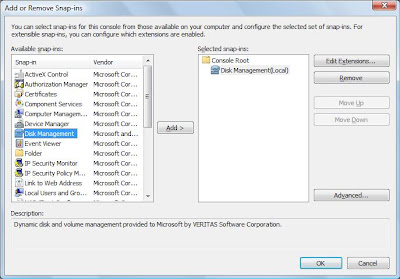
5). In add and remove snaps in window select Disk Management and then click on Add.
5). In add and remove snaps in window select Disk Management and then click on Add.
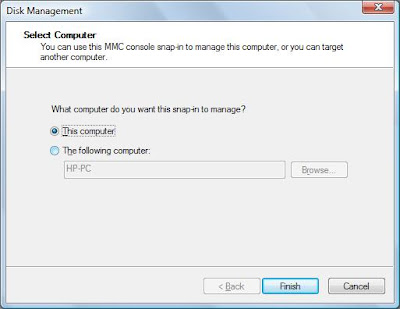
6). In disk management window, select This computer and then click on Finish.
7). Now press OK on the Add or Remove snap-ins screen.
8). Now select Disk Management from the left menu.
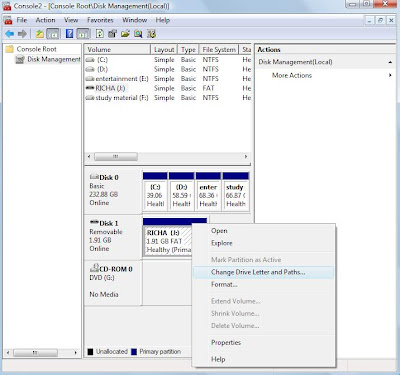
9).You will now see all of your drives/partitions in the right hand side panel.
10). Right click the USB drive you want to assign a permanent letter to and select Change Drive Letter and Paths.
 11). Click on Change.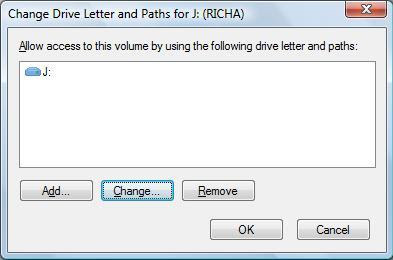
12). Select a permanent letter.
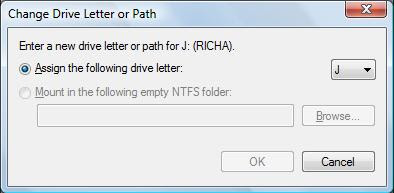
13). Click OK.
14). It will warn you about making the change - there is little chance programs you use will be affected by this. If they will, you will probably already be aware of this so don’t worry.
15). The final step is to select File > Save and save the file in the default directory. Close the Console and you are done.
Its done..
Labels: Cool Tricks, Tricks, Tweaks, USB
posted by admin @ 10:52 PM
0 Comments


